AI marketing agency for small business

Agency-level marketing. Without the agency bill.

A marketing director and specialists for SEO, Google Maps, Google Ads, Meta Ads and social media. They work in your own accounts on the schedule you set and show what each change brought.

  • SEO from your real data. Page titles, technical fixes, schema and content, based on your Search Console and Analytics. Written for Google and for AI answers.
  • A whole team, not an agency invoice. Start free. Credit packs from €20, plus your own AI assistant subscription.
  • You stay in control. Every action is logged, money moves only with your click or inside daily limits you set, and your accounts stay yours.

100 free tool calls a month · No card · No lock-in · Works with Claude, Gemini, Hermes or any agent that can call an API

Built and used daily by a working marketing agency
20+ active projects · 870+ tasks completed in the last 30 days · 31,000+ agent tool runs · Every action logged
Your dashboard

Your whole marketing on one page. In plain words.

You sign in with a link from your e-mail, no password. Today shows what your team did, what it brought and what needs you. Every decision is explained for a business owner, not a marketer: what happens, what it costs and whether you can undo it.

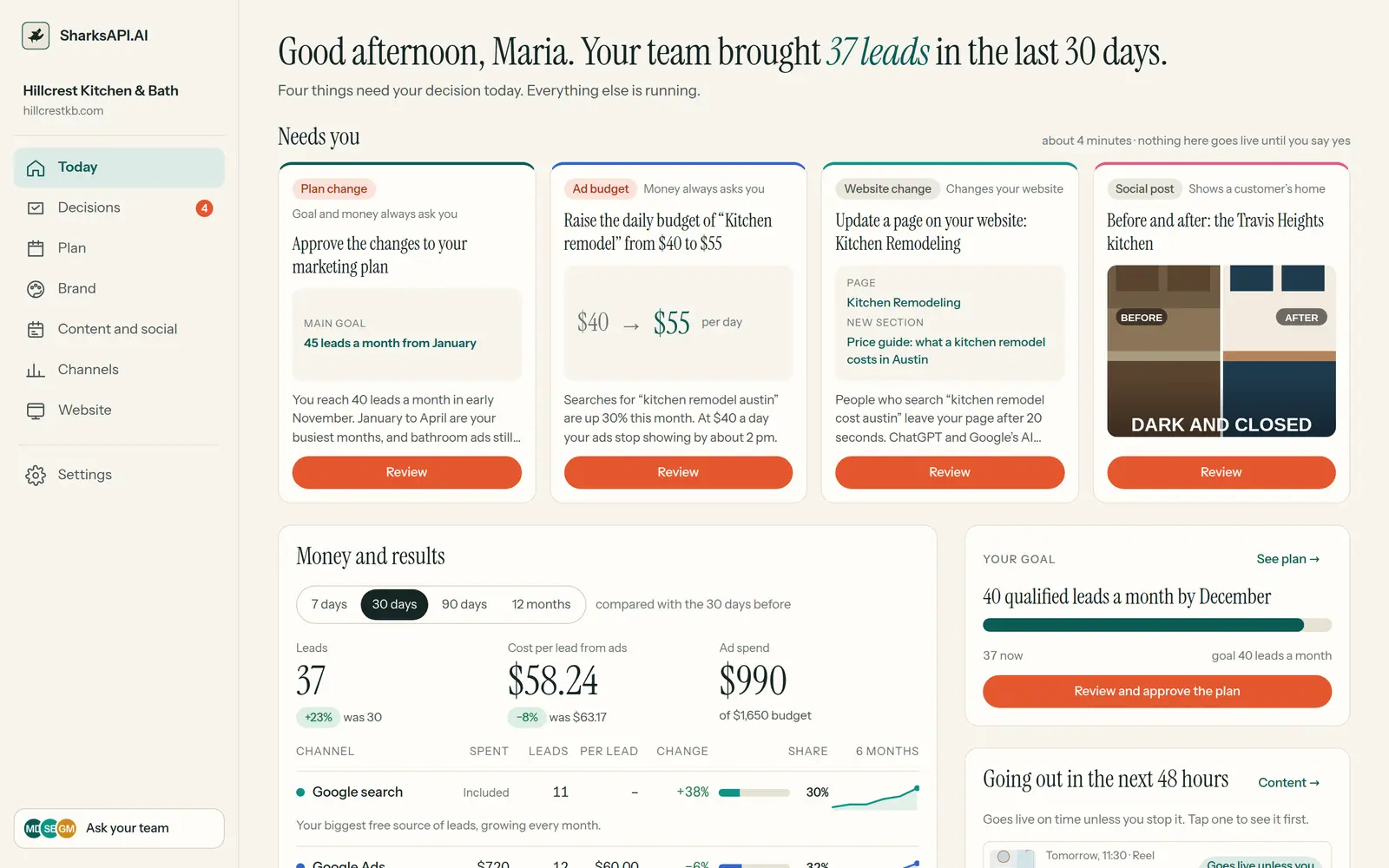
The Today page: 37 leads in the last 30 days, four decisions waiting, money and results by channel
Today. Leads, cost per lead and ad spend by channel, the week in short from your marketing director, and everything that goes out in the next 48 hours.
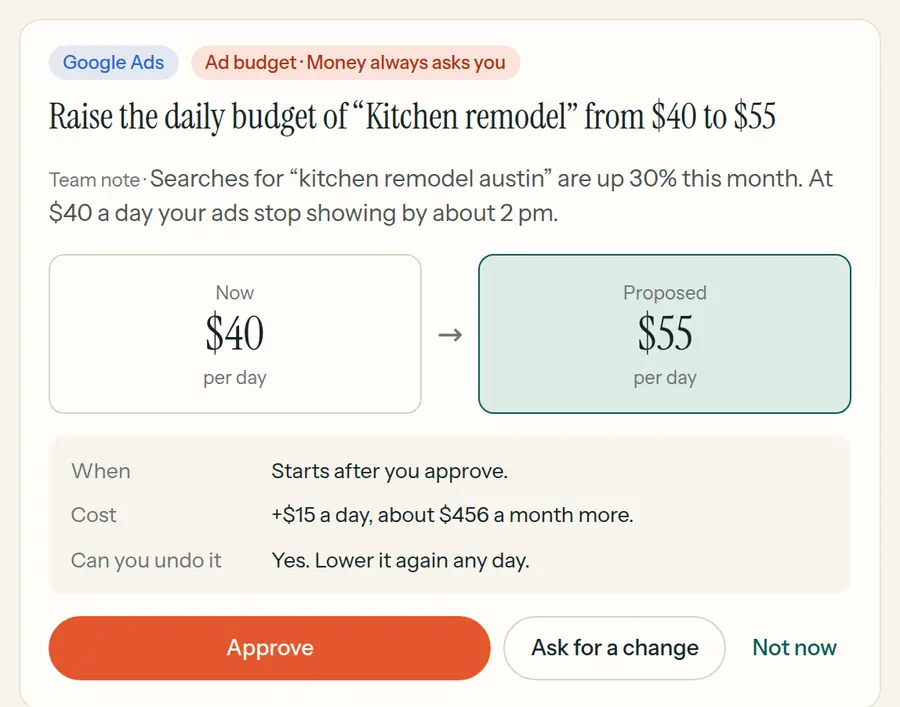
Decisions: a budget raise, a page change and a social post waiting for approval
Decisions. Every decision is one card: what happens, what it costs, whether you can undo it, and why your team asks. Approve, ask for a change, or not now.
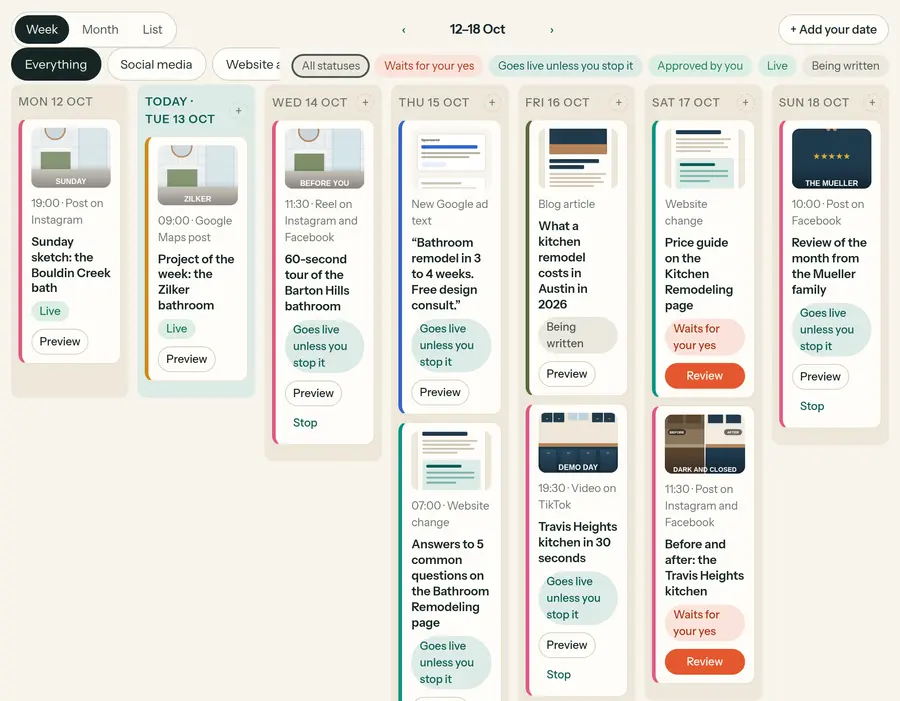
The content calendar with posts, page changes and ads for the week
Content and social. Every post, page and ad before it goes out, in a calendar. Edit the text, swap the picture, move it to another day, or stop it.
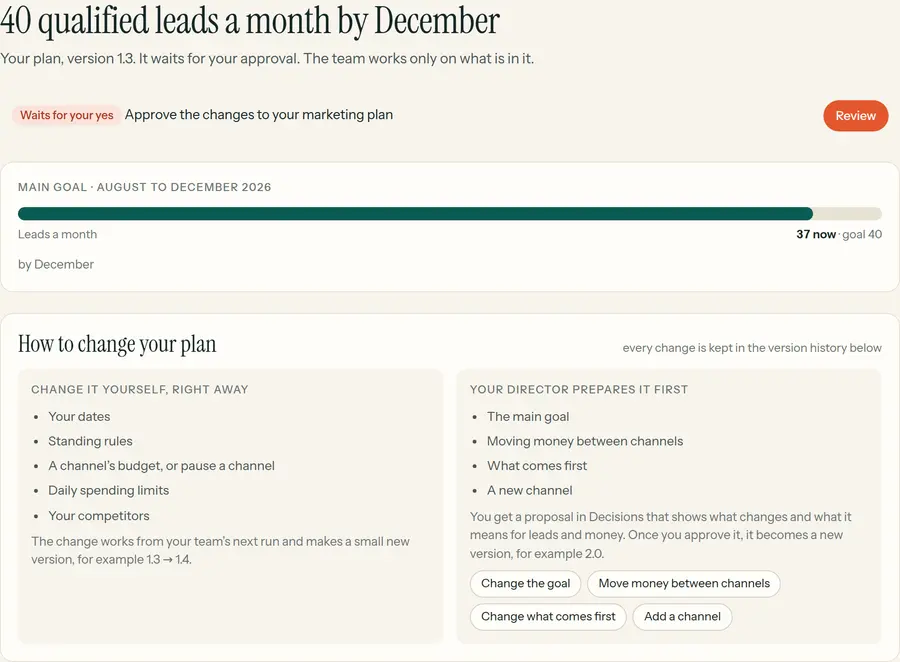
The marketing plan with its goal, numbers and monthly plan
Plan. Your goal, budgets, daily ad limits, your own dates, rules and competitors. Change any of it yourself; every change becomes a new version.
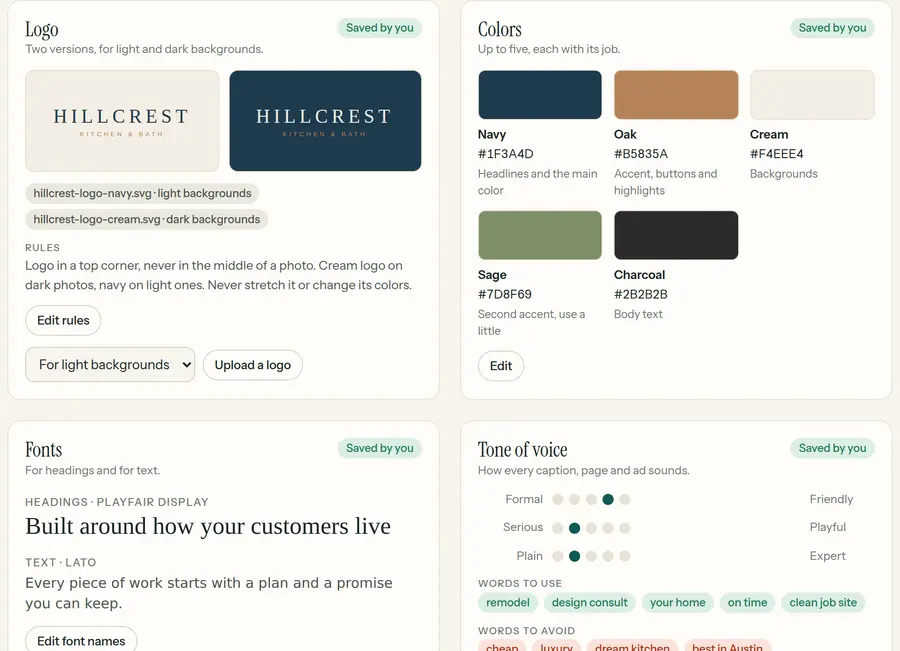
The brand page with logo, colors, fonts and tone of voice
Brand. Logo, colors, fonts, tone of voice and photos. Upload your brand guide, or let the team read your website and check what it found.
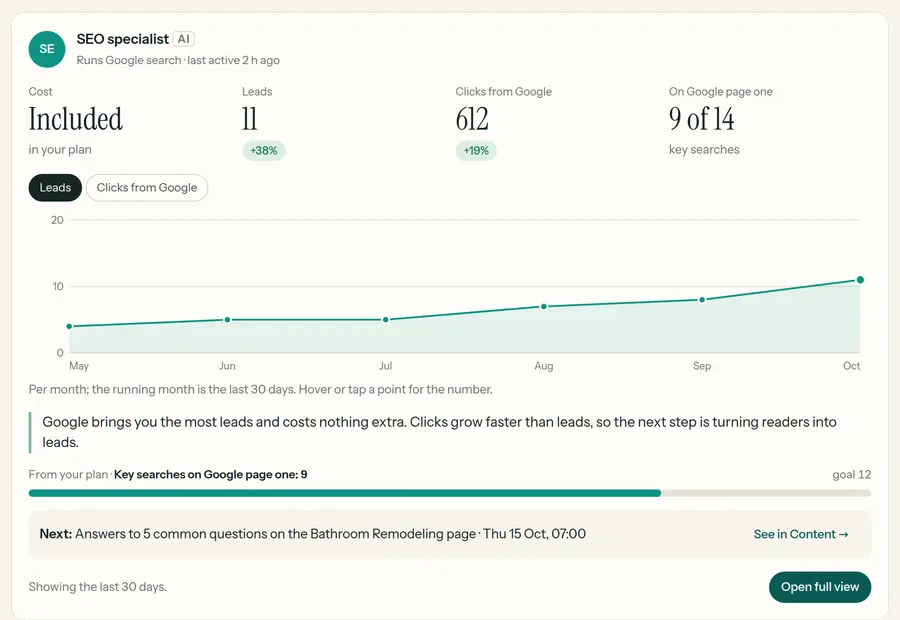
The Google search channel: leads, clicks and positions
Channels. What each channel costs, what it brought and what comes next: Google search, Google Ads, Meta Ads and Google Maps, with the full view one click away.
Settings: autonomy levels, people with access and connected tools
Settings. How much your team does on its own, channel by channel. Your own people with their roles, your connected tools and your credits.
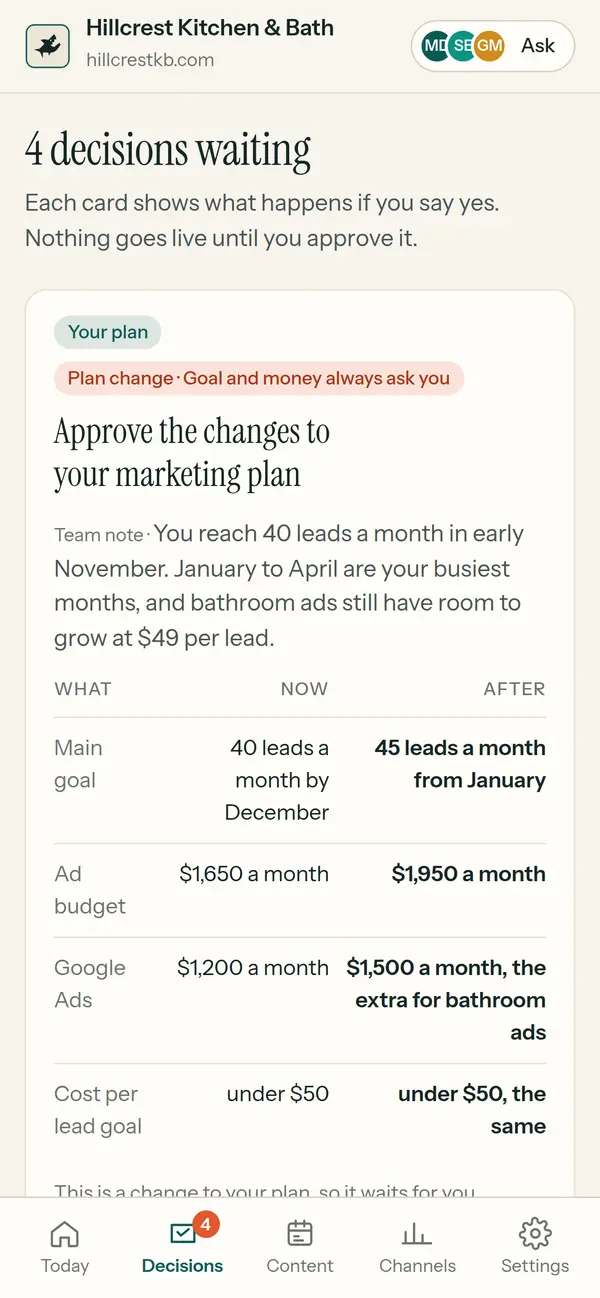
The Decisions page on a phone
✓Every Monday. Your marketing director writes the week in short: what the team did, what it gave and what comes next. On Today and in your inbox.
✓Ask your team. Write a question as you would to a person. Your team answers on your page, and you get the answer by e-mail.
✓Your website. Speed and visits, and a box for changes: “change the phone number in the footer”. Small ones are done within a day.
✓On your phone. Decisions, the calendar and the numbers fit a phone. Approve a post on your way to work.
Open the live demo → A made-up remodeler in Austin. Nothing you press there changes anything.
Your AI team

One marketing director. A specialist for every channel.

You talk to your marketing director the way you would talk to an agency account manager. It plans, hands the work to the specialists, measures every result and reports back. Each specialist runs one channel with its own permissions, and every action is logged.

MDMarketing director
Your one contact. Plans the work, hands it to the specialists, measures every result and writes you the week in short every Monday.
Plans · measures · reports
SESEO specialist
Google search and AI answers: technical audits, keywords, page titles, redirects and schema, from your real Search Console and Analytics data.
Search Console · GA4 · Bing · WordPress
GMGoogle Maps specialist
Your Google Business Profile: posts, photos, review replies and the details people see on Google Maps.
Google Business Profile
GAGoogle Ads manager
Search campaigns, keywords and negative keywords, ad texts and ad schedules. Budgets move only inside your daily limits.
Google Ads
MAMeta Ads manager
Facebook and Instagram ads: new ads from your pictures, pausing the weak ones, budgets only inside your daily limits.
Meta Ads
SMSocial media manager
Your content calendar: posts, carousels, reels and stories, comment replies and how each post did.
Facebook · Instagram · TikTok · LinkedIn
CWContent writer
Articles, landing pages and website texts in your WordPress, in your brand’s tone of voice.
WordPress
EME-mail marketer
Newsletters and e-mail campaigns to your own lists, in your tone of voice.
E-mail
ANAnalytics specialist
Tracking, Google Analytics and Microsoft Clarity: what happened, why it happened and what to do next.
GA4 · Clarity · Search Console
WDWeb developer
Website upkeep, speed and the small changes you ask for, like a new phone number in the footer.
WordPress · your website

What your AI team delivers

Every day. The data behind your dashboards is re-read each night. Approved posts and emails go out on time.
Every week. On Mondays, your marketing director's summary: what the team did, what it gave, what comes next and what waits for your decision. On your dashboard and by e-mail.
Every month. When you ask, or on a monthly schedule you set, your AI checks results against your KPIs, updates the plan and sets the next priorities.
After every measurable change. Its impact is checked automatically after 14 and 28 days.
Services the team covers
SEO & GEO Google Ads Meta Ads Content & blog Social media Email & newsletters Local SEO (Google Business) Analytics & reporting Merchant Center feeds
Autonomy, channel by channel

You choose what the AI may do alone

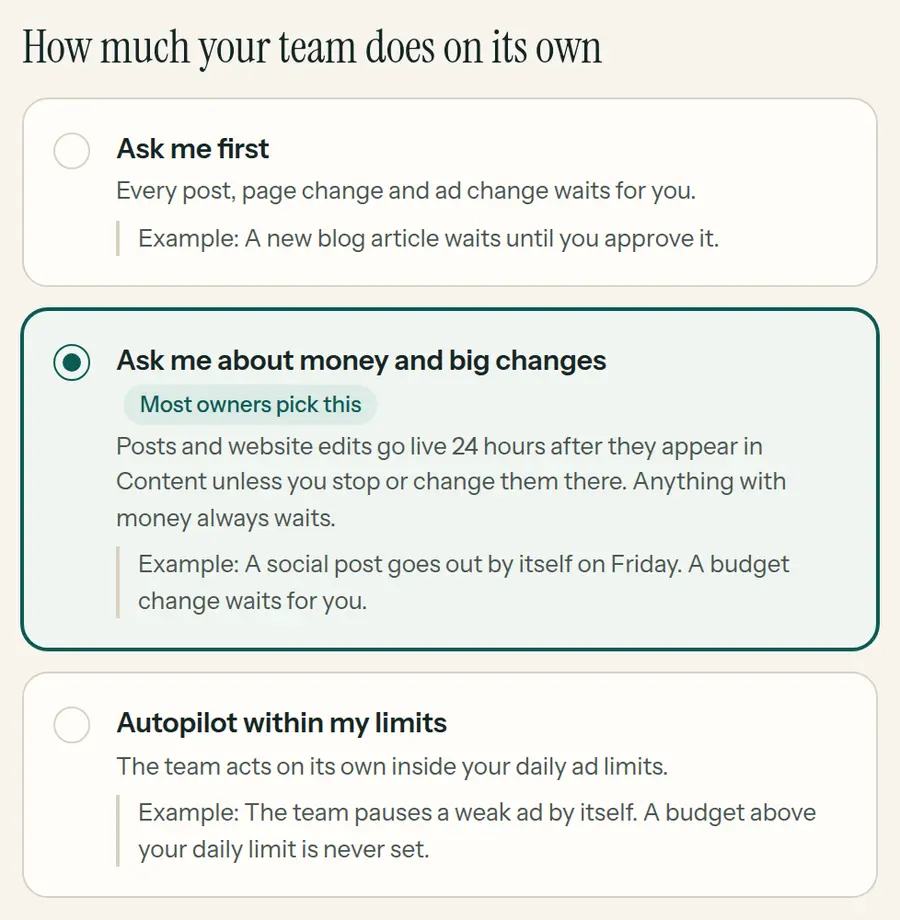
Pick one level for the whole team, then give any channel its own: Google search on autopilot and social media on ask first, for example. Change it any day in Settings.

Ask me first
Everything waits for you
Every post, page change and ad change waits in Decisions until you approve it.
Example: a new blog article waits until you approve it
Most owners pick this
Money and big changes
Ask me about money and big changes
Posts and website edits go live 24 hours after they appear in your calendar, unless you stop or change them. Anything with money always waits for you.
Example: a post goes out by itself on Friday; a budget change waits
Autopilot
Autopilot within my limits
The team acts on its own inside your daily ad limits and reports what it did. You can stop any task at any moment.
Example: a weak ad is paused by itself; a budget above your limit is never set
ChannelOn Autopilot, without a clickStays with a person
SEO & GEOSEO titles and descriptions, redirects, schema and page edits in WordPressNothing extra
ContentBlog drafts and publishing, edits to existing posts, newsletters and scheduled emailsEmails sent right away to customers and leads have their own row, which starts on Approve (one click each)
Social mediaPosts, carousels, reels and stories on Facebook, Instagram and TikTok; comment repliesNothing extra; each post type can have its own level
Google & Meta AdsPausing, negative keywords, ad texts, ad schedule, new campaigns created pausedStarting campaigns and changing budgets, unless you open that exact row. Then only inside your daily ceilings.
Local SEOGoogle Business posts, review replies, photos and profile editsNothing extra
On every levelScheduled reports and dashboards never waitPayments and invoices, documents for signing, Google Chat messages, disconnecting accounts, deleting files in Google Drive
Hard limits are always yours
✓Approvals, autonomy levels and budget ceilings are checked by the platform on every tool call, not by a prompt
✓Through SharksAPI, ad budgets move only inside the daily ceilings you set. With no ceilings set, it changes no budgets at all
✓Brand voice and other rules live in shared memory that every agent loads before it works
✓Every change is logged; take over any task, anytime
Security model
✓OAuth2 scoped access per connection
✓Per-agent credentials, no shared tokens
✓Every connection is made with your own click or your own API key
✓Credentials encrypted on AWS in Stockholm (EU); disconnect anytime
This is not another tool to learn.
This is your marketing department.
How it works

Two layers, one team

No software to install. Your own AI assistant becomes your marketing team; SharksAPI gives it the accounts, playbooks, memory and guardrails.

Your AI assistant does the work
Claude, Gemini, Hermes or any agent that can call an API connects as your AI marketing team. It plans, writes and changes things when you ask, or on the schedule you set, for example every weekday at 8.
SharksAPI runs around the clock
It keeps your accounts connected, re-reads your dashboard data every night, publishes approved and scheduled posts and emails on time, sends scheduled reports and measures the impact of every measurable change. Approvals and budget ceilings are enforced here.

Start free in three steps

01
Copy the prompt
Paste it into Claude (Cowork, Desktop or Code), Gemini CLI, Hermes or another agent. Put your email in place of MY@EMAIL.
02
Click Allow
Your assistant sends you the Google, Meta and LinkedIn login screens one by one. That is the whole setup.
03
Open your dashboard
A first audit and a plan on your own dashboard. SharksAPI e-mails you the sign-in link: no password. Then set how much the team does on its own.
Setup prompt
Read the setup instructions at sharksapi.ai/llms.txt and use the A2A protocol. Register yourself at sharksapi.ai as my marketing agent (use my email MY@EMAIL as owner_email) and install your role skills from the skill catalog. Connect my GA4 account first, then my other marketing accounts one by one. Ask me for each approval link I need to click and continue setup after I authorize it. When the data sources are connected, run a first SEO and marketing audit and build my own SharksAPI dashboard (create_dashboard with role manager and self_serve true) with the plan, KPIs and audit findings. SharksAPI e-mails me the sign-in link, no password; I approve the plan there. Once I have approved it, set up the recurring work: create one scheduled task per job from recurring_jobs in get_onboarding_status here in this app (or give me each job’s time and prompt to create), so my team works every night.
No card needed: 100 free tool calls every month. Need more? See credit packs
example chat with your AI agent
You: Register yourself at sharksapi.ai and connect my Facebook Page.
AI: Done, I'm your agent now. Please click this to authorize Facebook: sharksapi.ai/oauth/agent/.../connect
You: *clicks, logs into Facebook, clicks Allow*
AI: You have 3 Pages. Which one should I connect?
You: The second one.
AI: Connected. This week's top post got 47 engagements. Want a full report?
See it in action

See the dashboard, live

This is what your AI team builds and keeps up to date for you. The demo is Hillcrest Kitchen & Bath, a made-up remodeler in Austin with made-up numbers: press anything, nothing changes.

Open the demo → One click. No password, no signup.
Today Decisions Plan Brand Content and social Channels Website Settings
Proof from real client work

Built where the work is real

SharksAPI is built and used every day at Marketing Sharks, a working marketing agency, on the same platform you would use.

870+
tasks completed in the last 30 days
31,000+
successful agent tool runs in 30 days
240+
drafts approved or published in 30 days
270+
agent changes measured at 14 and 28 days
Counted live from the platform across 20+ active projects. Demo accounts excluded.
Why this works

Agency capabilities without agency-sized overhead.

SharksAPI automates much of the monitoring, research, reporting and execution normally split across several specialists and software tools.

Hiring separately
SEO Specialist€1,500-3,000+ /mo
Google Ads Manager€1,000-2,500+ /mo
Copywriter€800-2,000+ /mo
Analytics Expert€1,000-2,000+ /mo
Marketing Strategist€1,500-3,000+ /mo
Typical total€5,800-12,500+ /mo
+ setup fees, tool subscriptions, coordination overhead
✕Works business hours only
✕Each specialist sees only their silo
✕Reports take days, data is always old
✕Scaling up = hiring more people
Recommended
SharksAPISharksAPI AI team
SEO specialistIncluded
Google Ads and Meta Ads managersIncluded
Content writerIncluded
Analytics specialistIncluded
Marketing director with agency-built playbooksIncluded
Typical monthly usage€20-100 /mo
+ your AI assistant subscription (for example Claude or Gemini). Credit-based: 1 credit = 1 tool call. Start free, top up from €20. No setup fees, no seats, no lock-in.
✓Works on the schedule you set, weekends included
✓Cross-channel visibility: every agent sees all data
✓Live dashboards with strategy tracking
✓Add channels, not people

Want a person to own it? Our agency, Marketing Sharks, runs SharksAPI for you with a human strategist. marketingsharks.ee

Pricing

Start free. Scale when it works.

Your own AI marketing team for your business. Pricing is credit-based: 1 credit = 1 tool call. No per-agent seats: you pay for the work your AI team actually performs.

Pack Price Credits Per tool call Best for
Free €0/mo 100/ month €0 Try the full AI marketing team, connect tools, run audits and approve every action before anything goes live.
Business €50 top-up 3,000 €0.017 Every channel each week, or daily reads of your numbers.
↻ Top up anytime
Running low mid-campaign? Buy a pack in one click. New credits apply instantly and your AI team continues exactly where it left off.
∞ Credits never expire
Purchased credits carry over month to month, so you can buy a bigger pack at a better rate without worrying about a use-by date. Free tier refills 100 credits every month.
✓ Nothing breaks at zero
If the balance hits zero, agents simply pause new tool calls. Dashboards, data and history stay intact. Top up and work resumes.
See credit packs →
Every business starts on the free tier. Move to Starter when your team works every week; a bigger pack only lowers the price per tool call, and unused credits never expire.
No setup fee. No lock-in contract. Your accounts stay yours. Disconnect anytime.
Shared Memory

A team that never forgets

Most AI tools forget. Every new chat, model or agent starts half-blind, and you explain the same business again. We solve that by keeping the memory in your hands, in our own database under your control. Every decision, result and lesson is written into your team's shared memory, so the Ads agent knows what the SEO agent learned and Monday's agent knows what Friday's agent did.

✓No more re-explaining your business every session
✓Decisions carry context: what was done and why
✓You see the same live state everywhere: dashboard, Claude, phone
✓Fire a channel, add a channel, and the memory stays
✓The memory stays yours. Export it anytime if you want it in your own stack
Your own AI tools can read the same memory too, and because the memory stays under your control, you can export it whenever you want.
shared memory · live
[decision|seo] priority moved to “referral marketing software” cluster: GSC shows pos 6–11, fastest path to incremental clicks
[constraint|paid] keep spend under €900/mo · no brand bidding · CAC target below €120
[insight|content] “finders fees vs referral fees” is pulling the most search demand; spin out 3 supporting articles and 1 comparison page
[result|cro] landing page B lifted signup CVR 2.1% → 3.4% in 14 days; keep headline, test pricing CTA next
[next_action|team] SEO expands internal links · Content drafts 2 posts · Ads shifts budget to high-intent terms
Every agent starts from the same live memory. Every new decision writes back into the same shared state.
About us

Built by an agency that still uses it every day.

SharksAPI.AI was born from a real digital agency need: how do you run SEO, ads, analytics, content and reporting across many clients without losing control, quality or context? As a small agency, we also wanted to be among the first to ride the AI wave, using automation and agent workflows to compete with much larger agency groups that have hundreds of people on payroll.

Our team has worked in digital marketing since 2012. The playbooks, skills and operational know-how we developed while running campaigns for real businesses are now built into this tool: specialist AI agents, live dashboards, approvals, memory, audit trails and direct integrations with the tools marketers already use.

We are not only building SharksAPI.AI. We operate with it. Today we use the same system to market 18 different clients: some channels run on autopilot, some on semi-pilot with human approval, and some companies already use the tool directly inside their own teams.

Our mission

Our mission is to help small and medium-sized businesses access the kind of full digital agency know-how they could not previously afford. With SharksAPI.AI, they get practical strategy, specialist skills, AI agents, dashboards and execution support at a fraction of the traditional agency cost, often with more speed, memory and consistency than the classic agency model can offer.

See pricing → See the live demo
Diana Taluri DT

Diana Taluri

Managing Partner · MBA in Marketing
LinkedIn ↗

Diana brings the growth and marketing strategy side of SharksAPI.AI. Her background combines digital marketing, B2B sales, referral marketing and go-to-market work: the same fields where AI agents need strong judgement, not just automation.

Digital marketing strategy B2B sales Referral & word-of-mouth growth Analytics and KPIs Marketing operations
Tanel Taluri TT

Tanel Taluri

Founder · IT background since 1998
LinkedIn ↗

Tanel brings the product, automation and technical execution side. His background combines 10+ years of senior SEO expertise, web development and project management in Estonia; he is also a certified Google Partner and holds Claude and other AI/platform certifications. His work connects agency delivery, Laravel / web development and the practical systems needed to run marketing agents safely for real clients.

Web development Laravel / integrations SEO / GEO Marketing automation Agent workflows
Founder experience built into the product
2012
agency marketing experience since
870+
tasks completed in the last 30 days
30+
marketing integrations
60+
AI marketing skills and playbooks
FAQ

Questions, answered

What does Autopilot do without my click?+

It depends on the channel; see the table above. SEO changes, posts, ad texts and pausing can run on their own. Starting campaigns and changing budgets wait for a person unless you open that exact row, and then only inside your daily ceilings. Payments, invoices, documents for signing, Google Chat messages, disconnecting accounts and deleting Drive files always wait for a click. Emails sent right away to customers and leads have their own row, which starts on Approve.

Can the AI overspend my ad budget?+

Not through SharksAPI. Starting campaigns and changing budgets need a person's click or a row you opened yourself, and the platform refuses any budget above your daily ceilings. Other ad changes follow the level you set for the channel, and every change is logged. If your AI also works in the Google or Meta Ads interface in your browser, its instructions leave budgets to you, but SharksAPI cannot enforce that part.

Does it really work 24/7?+

The platform does. Every minute it sends the posts and emails that are due, every night it refreshes your dashboard data and measures earlier changes, and on Mondays your marketing director's summary of the week arrives on your dashboard and by e-mail. The planning and writing run in your AI assistant, on demand or on the schedule you set.

Do I need to know anything technical?+

No coding. You need an AI assistant that can make web requests, such as Claude, Gemini CLI or Hermes. You paste one prompt, click Allow on a few login screens, and talk to your AI marketing director in plain language. Your decisions are cards on your own dashboard: approve, ask for a change, or not now.

Do I need a password?+

No. You sign in to your dashboard with a link SharksAPI e-mails you, and invite your own people the same way: owner, can approve posts and pages, or can see everything. Your AI never sees the passwords of your accounts either.

Which AI sees my data?+

The AI assistant you connect reads the data it asks for through your connections. Your credentials are stored encrypted on SharksAPI servers on AWS in Stockholm (EU), and agents never see your passwords.

What tools does it work with?+

GA4, Search Console, Google Ads, Meta Ads, Facebook, Instagram, LinkedIn, TikTok, WordPress, Microsoft Clarity, Google Business Profile, Merchant Center and more: 30+ marketing integrations, 30+ in total.

How are payments handled?+

Paid plans use secure card checkout via Stripe. Stripe handles the payment flow; SharksAPI.AI does not store your card details. Your credits are added after payment confirmation.

What if I already have an agency or a marketer?+

Keep them. Put the channels they run on Ask first: the AI team prepares audits, data and drafts, and nothing goes out without a yes. Invite them to your dashboard as people who can approve posts and pages. Many teams run a mix.

Can someone run it for us?+

Yes. Marketing Sharks, the agency that built SharksAPI, can run the AI team for you with a human strategist on top. See marketingsharks.ee.

Can my own AI agent use SharksAPI?+

Yes. SharksAPI is agent-first under the hood. Any agent (Claude, Gemini, custom) can register via API and work through A2A/MCP. See the developer section below.
For developers and AI agents: API, A2A/MCP and self-onboarding +
Example Tool Use

Agent Reasoning Flow

Task "Review the last 7 days of traffic, find what brings visitors, and tell me what to do next to get more traffic."
1. Discover: find the right tools for traffic, channels and search performance
2. Check auth: confirm GA4 and Search Console are connected
3. Read the last 7 days: sessions, channels, top pages and top queries
4. Compare what is working now versus what is flat or underperforming
5. Return concrete next steps: which pages to improve, which channels to push, and what to publish next for more visits
✓ Marketing flow: inspect → understand → recommend → improve traffic
For AI Agents

Agents Can Onboard Themselves

API-first onboarding. Register, get a token and start discovering tools through A2A or MCP. Human approval is requested only when an account connection requires OAuth.

1
Register via API
POST to /api/v1/agents/register - get credentials instantly
2
OAuth2 Token
Use client_credentials grant - tokens valid for 1 year
3
Access 380+ tools + 60+ skills
Across 30+ integrations on the full platform, including 30+ marketing integrations and downloadable skills for SEO audits, content, paid ads and more.
4
OAuth services → forward link to human
Google, Facebook/Instagram, LinkedIn, Microsoft and Notion require interactive login. Agent calls POST /connections/init then gives the returned authorization_url to the human owner. Agent cannot log in itself.